Upscaling Images with AI Tools

My wife loves to decorate. She has a keen eye and knows exactly what she wants. Generally that means scouring the internet for something she can hang on our wall somewhere.
If I can buy a hi-res image, then great. If not, then I'm left figuring out how to make it the right size and scale it big enough to print.
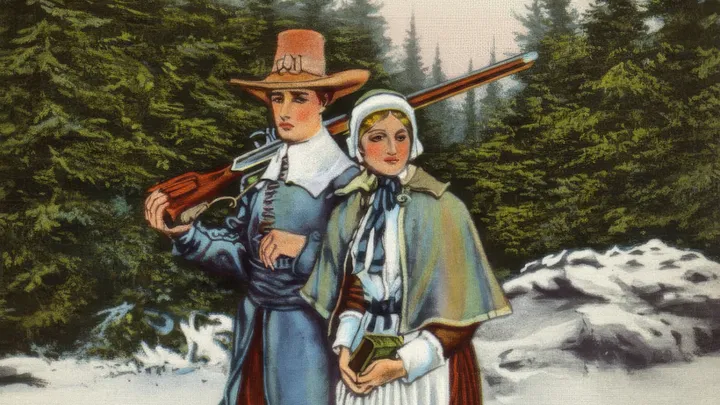
Here is today's example that she found on Wikimedia Commons:

She is a descendant of John and Priscilla Alden, so she would like an 8x10 image printed for Thanksgiving decor.
The challenge is that if you were to crop it to 8x10, you would have to cut off their feet. She wanted it expanded. Years ago, this would have been nearly impossible to make look decent. Now with AI, we have more options.
I used Photoshop to crop and then expand the image and remove the handwriting on the side. I then had this image that I used in the next step:

I tried various tools: Midjourney, ChatGPT, Grok, and finally got a decent result with Google Gemini. But I first had to expand it to 4:5 (8:10) ratio and tell it to fill in the white areas.
Here is what Gemini created:

I removed the Gemini watermark, then ran it through Topaz Gigapixel to upscale it to a higher resolution. I have an old version of the software that I use sporadically—not enough to justify keeping a regular subscription.
Here is the final image ready to print (click to download full resolution):

 Try EnvelopeBudget - Your grandparents' budget for the modern
age
Try EnvelopeBudget - Your grandparents' budget for the modern
age
 Need a custom website, app, or automation? Let's talk