How I Built an Autonomous QA Pipeline with AI Agents on a Mac Mini

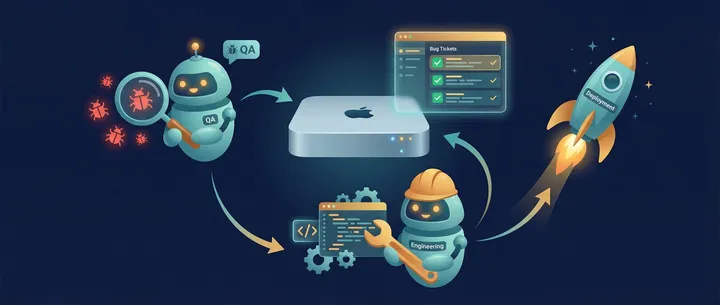
I've been using OpenClaw agents for a while now. But the setup I'm most proud of is the autonomous QA pipeline I built for Envelope Budget. It finds bugs, fixes them, and deploys to production — all without me touching the keyboard.
Here's how it works.
The Agents
I run OpenClaw on a Mac Mini at home. I have several agents, each with their own role. But I'm going to focus on 3:
- Clive — my main assistant
- Penny — QA
- Eddie — Engineering
The star of this post is Penny. She's the one who changed how I think about testing.

What Penny Does
Every 4 hours, Penny spins up Envelope Budget's full Docker environment — PostgreSQL, Redis, and Django — and goes to work.
But she's not running scripted tests. She's doing AI-driven exploratory testing. She reads the actual API code, thinks about edge cases, and tries to break things.
She uses curl and Python to hit the API with creative scenarios:
- Negative amounts on transactions
- Race conditions on concurrent budget updates
- Special characters in category names
- Boundary conditions on date ranges
- Auth edge cases
The key word here is exploratory. She's not following a test plan. She's thinking about what could go wrong and trying it. This catches things that scripted tests never would — because no one thought to write a test for it.
She also uses Playwright MCP to do browser-based UX testing. She navigates the production site as a brand new user, goes through the full onboarding flow, and evaluates every screen. UX findings go into the same pipeline as API bugs.
All findings — reproduction steps, full API requests and responses, severity ratings — go into a SQLite database.
The Dashboard
I built an HTMX dashboard to review everything Penny finds. It's simple but effective:
- Findings sorted by severity (critical, high, medium, low)
- Sortable columns and filters
- Dark/light/system theme switcher
Each finding has a set of action buttons:
- Fix This — spawns Eddie to fix the bug
- Re-test — spawns Penny to re-verify
- Copy as Markdown — for sharing or documentation
There's also a Penny Notes field on each finding. This is more important than it sounds. If Penny reports something that's actually by design, I add a note like "this is intentional behavior" or "only test this after the migration runs." These notes become training data — Penny reads them before her next run so she doesn't keep reporting the same things.
Findings that have been fixed and deployed get archived. Everything has a full action history with persistent logs.
The Auto-Fix Pipeline
Here's where it gets fun.
- Penny finds a bug and logs it with full reproduction steps
- I review the finding on the dashboard and confirm it's a real bug
- Every hour, a cron job picks the highest-severity confirmed finding
- Eddie (Claude Code + Opus) reads the finding and fixes the code
- Eddie commits and pushes to git
- GitHub Actions auto-deploys to production
- Penny retests the exact scenario that was originally reported
- If passed → the finding stays fixed. If failed → it's marked
retest_failedfor my review
The entire cycle — from "Penny finds bug" to "deployed to production" — happens without me doing anything beyond that initial confirmation.
I intentionally limit it to one finding per hour. This keeps things steady without burning through API credits in a spiral. It also makes it easy to track what changed if something breaks.
What I've Learned
Exploratory testing finds things scripted tests miss. Race conditions, weird edge cases, input combinations that only the best QA engineers would think to write a test for. Penny has caught real concurrency bugs that only showed up because she was hammering the API with creative scenarios.
Match your test database to production. I use PostgreSQL in the test environment because that's what runs in production. Early on I considered using SQLite for faster test runs, but PostgreSQL's concurrency behavior is different enough that real bugs would have been masked. Glad I didn't cut that corner.
The training data field is crucial. Without Penny Notes, Penny would keep re-reporting the same known behaviors every 4 hours. The notes field turns her findings into a feedback loop — each run gets smarter about what's actually a bug vs. what's intentional.
A Mac Mini is plenty. This whole pipeline — Docker environments, AI agents, the dashboard — runs on a Mac Mini sitting on a shelf at home. No cloud server needed.
The Result
I wake up most mornings to a dashboard showing what Penny found overnight, what Eddie fixed, and what's already been deployed. My job is just to review and confirm. The pipeline does the rest.
It's not perfect — sometimes Eddie's fixes need a human touch, and Penny occasionally reports false positives. But the ratio of signal to noise keeps improving as the Penny Notes build up.
The best part: I built this whole system in just a few weeks using OpenClaw agents. The agents helped build their own infrastructure. Penny tested the dashboard that displays her own findings. There's something poetic about that.
 Try EnvelopeBudget - Your grandparents' budget for the modern
age
Try EnvelopeBudget - Your grandparents' budget for the modern
age
 Need a custom website, app, or automation? Let's talk